A verdict for every item: does it come back?
- Every item gets one. Before anything moves, SiftMac labels each thing it finds Safe, Rebuilds or You decide, and says in plain words why.
- What it tells you: whether the item comes back after it’s removed, and how: by itself, by downloading or building again, or only from the Undo Shelf. In use and Locked mark things SiftMac won’t remove.
- What it costs you: nothing. The verdicts are part of the free scan, so you can read every one before you decide to clean.
1. How the verdicts work
Each verdict answers one question about an item: if it’s removed, does it come back? The badge sits next to every item and every category in the Detailed view. Click an item and the panel on the right repeats the verdict with a reason in plain words, a Comes back? line, and where the item lives.
| Badge | What it means | Comes back? | Examples |
|---|---|---|---|
| Safe | Nothing is lost. The app makes a fresh copy if it ever needs one. | Yes, on its own | App caches, logs older than a week, temp files from apps that have quit, copies of attachments you opened in Mail |
| Rebuilds | Comes back, but has to be downloaded or built again. | Yes, by downloading or building again | Homebrew, pip and other package caches, node_modules in old projects, Xcode DerivedData, iPhone update files |
| You decide | Can’t be brought back once it’s gone, so the choice is yours. | Only from the Undo Shelf, for most | Old downloads, unused apps, iPhone backups, old AI chats, large files, the Trash |
| In use | An open app or running program is using it. | Not removed | A cache folder while its app is open |
| Locked | macOS won’t let SiftMac move it without an administrator, or macOS or another app manages it. | Not removed | An app an administrator installed, Apple Intelligence models, purgeable space |
The Comes back? line gets specific where it can: “Yes, when you install again” for node_modules, “Yes, when you build again” for build output, “Yes, when you plug it in” for the symbols Xcode copies from a device, and “You keep the other copy” for a duplicate.
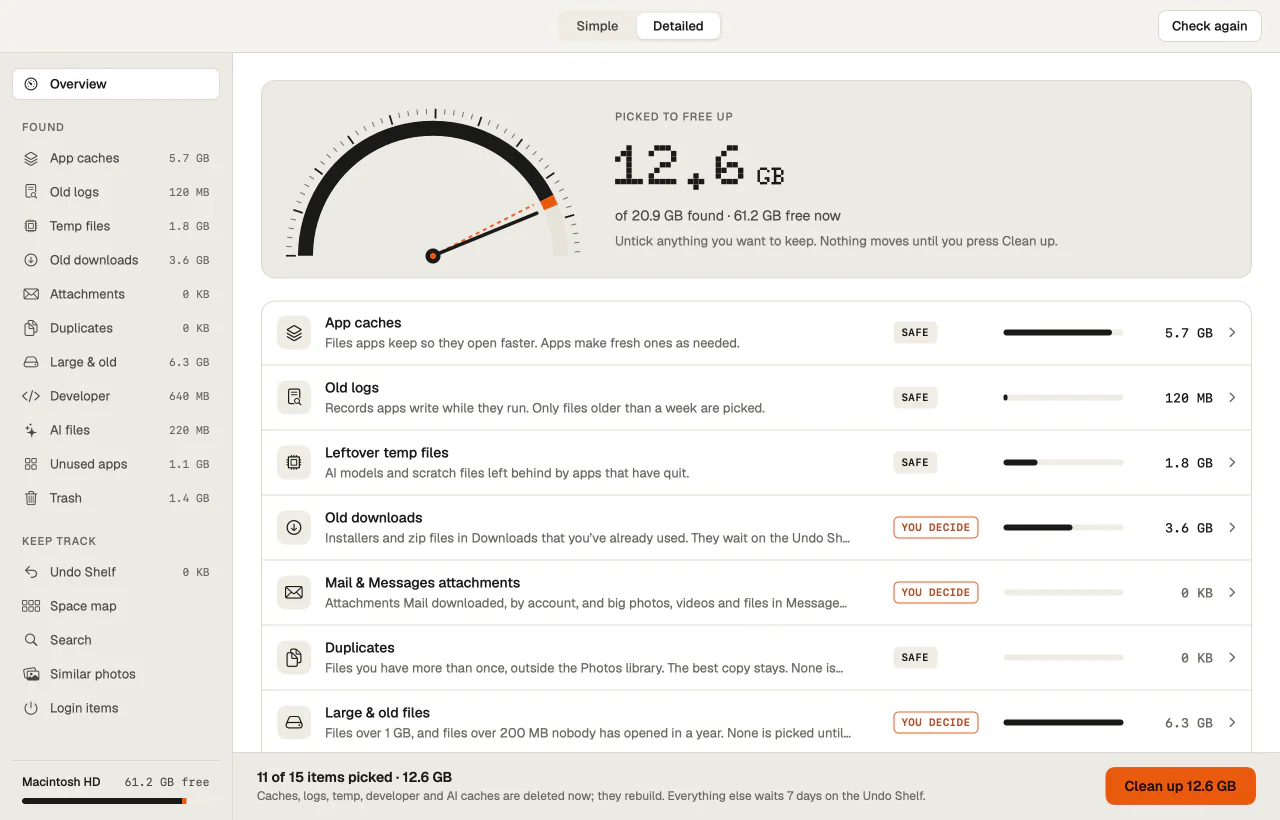
Where a verdict comes from
- What the item is. A cache folder is Safe. A cache belonging to a package manager such as Homebrew, pip, Yarn or CocoaPods is Rebuilds, because what’s in it has to be downloaded again.
- Where its other copy lives. Mail attachments from IMAP, Exchange, iCloud or Gmail accounts are Rebuilds, since the server keeps them; from a POP account or On My Mac, they’re You decide. A macOS installer for the version you already run is Rebuilds; one for a newer macOS is You decide.
- What’s running right now. In use beats every other verdict, then Locked. Both are worked out again on every check.
2. Why every item gets one
When a Mac fills up, the useful question about any folder is what happens after it’s gone. A cache comes back by itself. A Python environment comes back when you run pip install. An iPhone backup doesn’t come back at all. One total and one button hide that difference, and that’s where cleanups go wrong.
Putting the answer next to each item lets you skim the safe parts and slow down on the rest. It also sets the defaults: caches, logs, temp files, old downloads and the Trash start ticked, while apps, duplicates, large files, developer and AI files, Mail and Messages attachments and System Data wait for you to tick them.
To see a verdict without installing anything, paste a folder into the Does it come back? checker, which runs the same notes in your browser.
3. What a verdict doesn’t do
- It doesn’t judge what your files are worth. You decide means only you can say whether you still need it. SiftMac shows when it was last opened or used, and leaves the call to you.
- You decide doesn’t always mean the Undo Shelf. Most You decide items wait there, but downloaded AI models, installers for a newer macOS and stopped Docker containers are removed straight away. The panel on the right says so, or shows the command that removes the item, before you clean.
- Safe doesn’t mean ticked and forgotten. A duplicate is marked Safe because an identical copy stays, but it still starts unticked and still waits on the Undo Shelf, since a copy can be a deliberate backup.
- Locked items stay locked. Apple Intelligence models, Chrome’s on-device model, purgeable space and Docker’s disk image are listed to explain the space, never removed. Apps an administrator installed can go with Remove with password…, through macOS’s own password dialog.
- It reflects the moment of the check. Quit an app and its items lose their In use badge on the next check. Open one after checking, and SiftMac skips its caches, build folders and AI files when you clean.
Questions
What’s the difference between Safe and Rebuilds?
Both come back. Safe items come back on their own with nothing for you to do, like an app’s cache. Rebuilds items come back only when something downloads or builds them again, like a package cache or a project’s node_modules, which takes time and bandwidth.
Does “You decide” mean SiftMac thinks I should delete it?
No. It means the item can’t come back by itself once it’s gone, so it’s your call. Most of these start unticked, and most that you remove wait on the Undo Shelf for 7 days first.
Why is a duplicate marked Safe?
Because an identical copy stays where it is, so removing the extra one loses nothing. It still starts unticked and goes onto the Undo Shelf, and if the kept copy moves or changes before you clean, the extra one is kept too.
Why does an item say In use when I’m not using the app?
Something from that app is running, perhaps only a background helper, or the folder is shared by one maker’s apps: with Chrome open, Google’s whole cache folder counts as in use. Quit the app and check again (⌘R) to include it.
Do the verdicts need an internet connection?
No. They come from SiftMac’s own rules and notes, on your Mac. Nothing about your files is sent anywhere to be judged.
How SiftMac handles it. Every item in the Detailed view carries its verdict, a reason in plain words and a Comes back? line, and you can untick anything before you press Clean up. Scanning and reading the verdicts are free.
Download SiftMac · scanning is free, and so is your first 2 GB of cleaning · See how it works