How SiftMac knows what’s in use, and leaves it alone
- Never removed. Anything an open app or running program is using gets the In use badge, can’t be ticked, and is left out of every cleanup.
- Checked twice for caches, temp files, apps, build folders and AI files: once while SiftMac looks, and again right before it removes anything.
- To include it: quit the app, then check again.
1. How SiftMac tells what’s in use
When a check starts, SiftMac lists every open app, by name and bundle ID, and every other running program it can see, background helpers and command-line tools included. Each kind of item is matched in its own way:
- App caches. A folder in
~/Library/Cachescounts as in use when its name matches a running app’s bundle ID or name, when one is the start of the other (com.anthropic.claudefordesktop.ShipItbelongs to the Claude app), or when it’s a maker’s shared folder: with Chrome open,com.google.Chrome,GoogleandGoogle Chromeall count. When in doubt, it’s in use. - Leftover temp files. The compiled AI models ONNX Runtime leaves in the temp folder carry the ID of the process that made them. While that process is alive, they stay.
- Apps. An unused app that’s open right now isn’t removed.
- Developer files. A build folder or Python environment is in use when a running program lives inside it, like
.venv/bin/python. A booted simulator is in use too. - AI files. Caches and installed updates of Claude, Cursor, Windsurf and Antigravity wait until the app is closed, and so do the editors’ project chats. Old chats are skipped while their command-line tool (
claude,codexorgemini) is running. - Mail and Messages. Their attachments are in use while Mail or Messages is open.
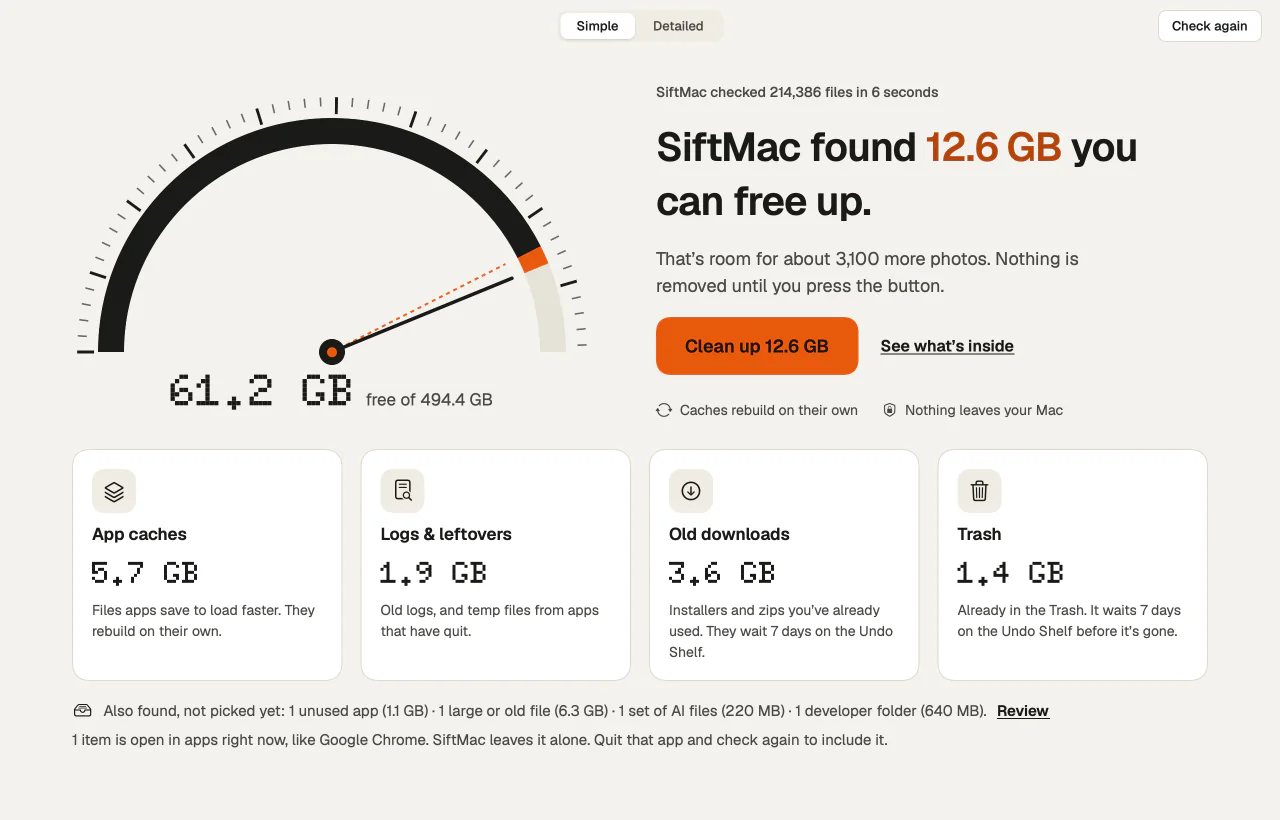
In-use items sit under Left alone in their category, with an In use badge and no tick box. Select one and the panel on the right says why: “Google Chrome is using this right now, so SiftMac leaves it alone. Quit it and check again to include it.” The overview and the Simple view say how many there are, and name one of the apps.
The second check
A check can sit on screen for hours before you clean. So when you press Clean up, SiftMac reads the running apps and programs again and skips any cache, temp file, app, build folder or AI item whose app or program has started since. The done screen says how many items it left for that reason. Duplicates get a check of their own: if the copy SiftMac meant to keep has moved or changed size, the extra copy stays too.
2. Why it matters
Removing files an app is still using is the easiest way for a cleanup to go wrong: the app can lose what it was in the middle of, or simply write the files straight back. A script running from a Python environment that disappears stops working. Waiting until the app is closed costs nothing, because the same files can go next time.
It also keeps the numbers honest. The totals SiftMac shows leave in-use items out, so what you see is what a cleanup can free now, not what it might free if you quit everything first.
3. What it doesn’t do
- It matches names, not open files. SiftMac ties folders to apps by bundle ID, name and process, and doesn’t look at which files each program has open. That’s why it leans towards In use for shared folders.
- Your own files aren’t checked against open documents. A file in Downloads, a large video or a duplicate isn’t tested for being open in, say, Preview. Those go onto the Undo Shelf instead, where Put back returns them.
- Mail and Messages are checked when SiftMac looks, not again before cleaning. Keep them closed until the cleanup is done; their attachments wait on the Undo Shelf either way.
- Recent logs are left out for a different reason. Logs newer than 7 days aren’t listed at all, since something may still be writing them.
- It doesn’t quit apps for you. To include an item, quit its app yourself with ⌘Q, since closing a window may leave it running, then choose Check again.
- Some things never show up at all. Apple’s own caches (
com.apple.…and a few system ones), SiftMac’s own cache, and anything in folders you add to Settings › Never touch stay out of every check, Quick clean included.
Questions
Why is a whole folder like Google marked In use?
Some makers keep one cache folder for several apps. With any of those apps open, SiftMac can’t tell which part belongs to which, so it leaves the whole folder alone until they’re closed.
I opened an app after the check. Is its cache safe?
Yes. SiftMac reads the running apps again right before it cleans and skips any cache whose app is now open. The done screen tells you how many items it left.
How do I clean a cache that’s in use?
Quit the app with ⌘Q, make sure it isn’t still running in the menu bar, then choose Check again (⌘R). The cache moves from Left alone into the list you can tick.
Does Quick clean in the menu bar skip open apps too?
Yes. It reads the running apps each time the panel opens and again before clearing, and only clears caches of apps that aren’t open. The scheduled cache clean works the same way.
How SiftMac handles it. Items in use get the In use badge, sit under Left alone and can’t be ticked; right before cleaning, SiftMac reads the running apps again and skips anything whose app has opened since. Quit the app and check again to include it.
Download SiftMac · scanning is free, and so is your first 2 GB of cleaning · See how it works