The Receipt: a cleanup, in sizes only
- A slip of what came back. After a cleanup, Share receipt shows a till-roll receipt: each category’s size, the total space back, free space before and after, and what’s waiting on the Undo Shelf.
- Sizes only: no file or folder names, ever, so it’s safe to post.
- Copy, save or share it as an image. It doesn’t leave your Mac unless you send it somewhere.
1. What’s on it
When a cleanup from SiftMac’s main window finishes, the done screen offers Share receipt, or Share your receipt in the Simple view. The receipt feeds out of a slot like a till roll, or simply appears with Reduce Motion on. From top to bottom:
- SIFTMAC RECEIPT, with the date and time of the cleanup;
- one line for each category that gave space back, such as App caches, Old logs, Old downloads or Trash, always in the app’s own order, each with its size;
- SPACE BACK, the total: what was deleted plus what moved to the Undo Shelf;
- Free before and Free after: your free space when SiftMac checked, and right after the cleanup;
- On Undo Shelf, with the hold in days and the size, when part of the cleanup is waiting there;
- and, at the bottom, “Sizes only. No file names. Nothing left the Mac.”
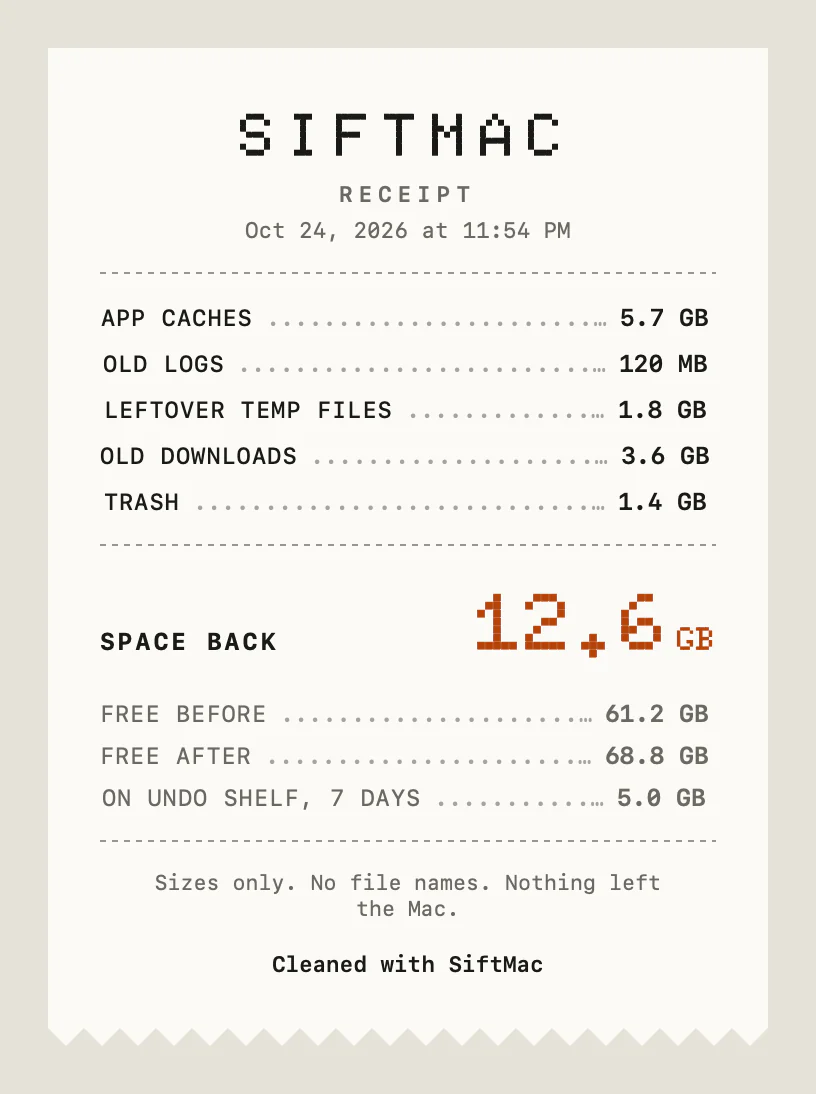
Under it, Copy image puts a PNG on the clipboard, Save… writes one wherever you choose, named like “SiftMac receipt 2026-11-20.png”, and Share… opens the macOS share menu. The image is drawn at twice its size, on paper white whatever your Mac’s appearance.
Each line counts only what really went. Anything that failed to move or be deleted is left out, and sizes follow the same honest measuring as the lists, so shared APFS space isn’t counted as space back.
2. Why a receipt
A cleanup that frees gigabytes in one click is easy to doubt. A receipt turns it into arithmetic: this much from caches, this much from downloads, this much still on the shelf, and your free space before and after. If the numbers didn’t add up, you’d see it.
It’s also made to be shared without a second thought. If you want to show what you cleared, or send it to someone who asked why their Mac was full, a list of file names would show far more than you meant to: client names, project names, what’s in your Downloads. The receipt carries categories and sizes, and nothing else.
3. What it doesn’t show
- No file names or paths, by design. To see what a cleanup moved, open the Undo Shelf, which lists every item for as long as it’s held.
- Space back isn’t all free yet. The total includes what went onto the Undo Shelf, which keeps its space until its hold ends. That’s why Free after can be lower than Free before plus Space back, and why the shelf has its own line.
- One per cleanup from the main window. Quick clean, scheduled cleans, apps dragged onto SiftMac, and files moved from Search or Similar photos don’t make one.
- No history. SiftMac doesn’t keep old receipts. It’s there until the next check; copy or save it if you want to keep it.
- Nothing is sent. It goes somewhere only when you copy, save or share it yourself.
Questions
Does the SiftMac receipt include file names?
No. It lists categories and sizes only, plus your free space before and after. The receipt says so itself: “Sizes only. No file names. Nothing left the Mac.”
Why is Free after lower than Free before plus Space back?
Space back includes what moved to the Undo Shelf, and that space is freed only when the hold ends or you empty the shelf. The receipt shows that part on its own line.
Where do I find the receipt?
On the done screen after a cleanup from the main window: Share receipt in the Detailed view, Share your receipt in the Simple view. It stays there until SiftMac checks your Mac again.
Is the receipt uploaded anywhere?
No. SiftMac draws it on your Mac, and it goes somewhere only if you copy, save or share it.
How SiftMac handles it. After every cleanup from the main window, SiftMac offers a receipt with each category’s size, the total space back, free space before and after and what’s on the Undo Shelf, and nothing else. Copy it, save it as a PNG or share it.
Download SiftMac · scanning is free, and so is your first 2 GB of cleaning · See how it works