SiftMac vs Mole: two one-time Mac cleaners, two different ideas
Mole and SiftMac have a lot in common. Both are native Mac apps that free disk space, both are one payment instead of a subscription, and neither uploads your files. They differ in what they’re for. Mole is a toolbox: cleanup, uninstalling and updating apps, maintenance, a disk map and a live system monitor, plus a free, open-source command-line version with a big following. SiftMac only frees space, and it’s built around one question it answers for every item before anything moves: does it come back?
- Choose Mole if you want one app for cleanup, app updates, maintenance and system stats (CPU, temperatures, fans, network), you also use a Windows PC, or you’d rather use a free, open-source tool in Terminal.
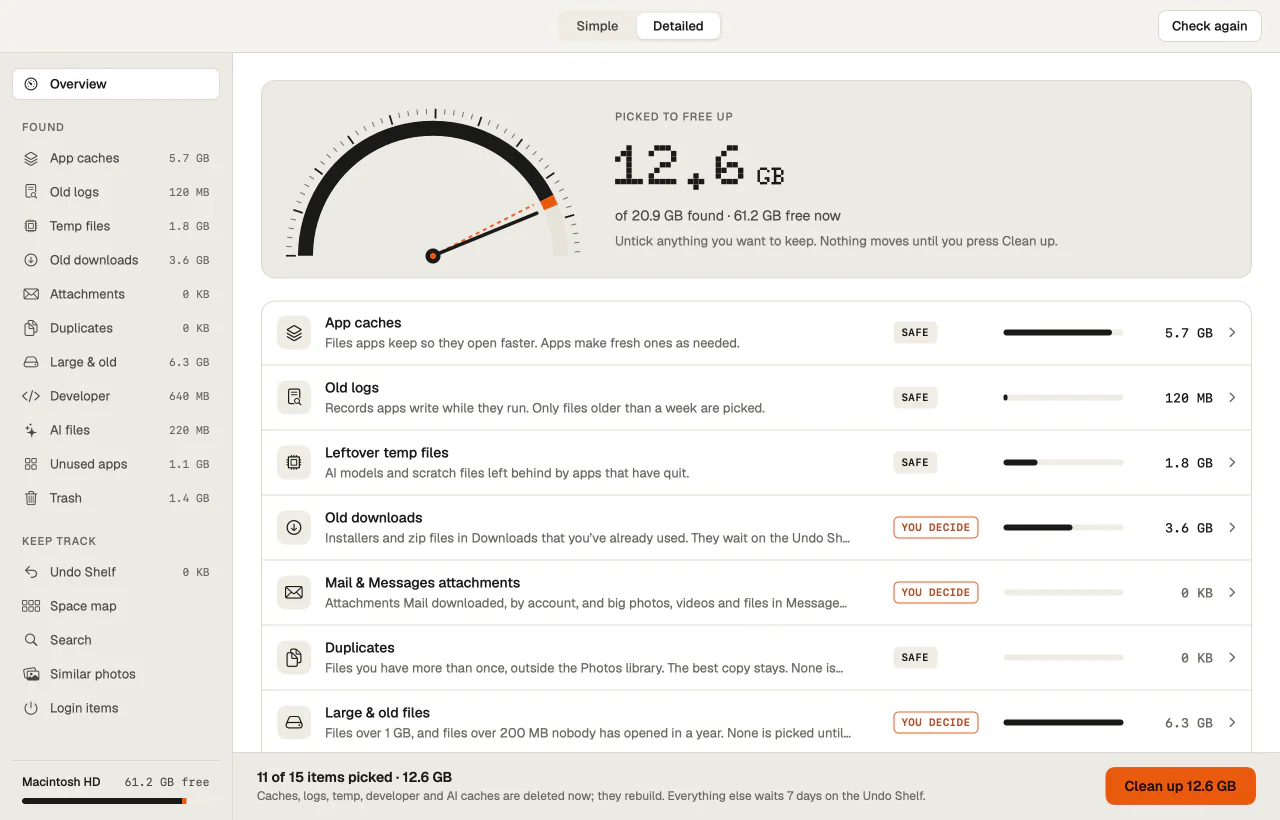
- Choose SiftMac if you want every item explained in plain words before it goes, and anything that can’t rebuild kept for 7 days so you can put it back.
Side by side
Mole’s details are from mole.fit, its Mac app and CLI comparison and the command-line version’s README, checked on 10 November 2026. If anything here about Mole is wrong, write to support@siftmac.com and I’ll correct it.
| SiftMac | Mole | |
|---|---|---|
| Website | siftmac.com | mole.fit |
| Made by | Mohit Nippanikar, a solo developer in India | Tw93, an independent developer |
| How you pay | Once. $12 for the first 100 buyers, then $19 (2 Macs); $29 for 5 Macs. Free updates. | Once. $19 (2 Macs). Free updates. A Windows version is sold separately. |
| Free to try | Scan and review everything; your first 2 GB of cleaning is free | Scanning is free; each cleaning tool works twice before it needs a licence |
| Refund | 14 days | 14 days |
| Free edition | No | The mo command-line tool: free and open source (GPL-3.0), about 74,500 stars on GitHub |
| Before anything moves | Every item gets a verdict (Safe, Rebuilds, You decide) and the reason in plain words | You review the list and choose what to clean, skip or protect. iPhone backups, iCloud Drive files and virtual machines are listed separately, since they may not come back |
| Way back | What can’t rebuild waits on the Undo Shelf for 7 days (or 14 or 30); Put back returns it to where it was | Uninstalled apps and disk-map deletions go to the Trash. Cleanup items are cleared once you confirm (see below) |
| Skips files in use | Yes, checked again right before cleaning | Not stated for cleanup; its maintenance skips tasks that are unsafe at the moment |
| System Data | Broken down, with what’s safe to clear | Its own group: local snapshots, system caches, logs, crash reports, old macOS installers |
| AI tool files | Claude Code, Cursor, Codex, Windsurf; Ollama, LM Studio and Hugging Face models are yours to decide | Caches, old versions and old sessions from nearly 30 AI tools; caches start selected, sessions are your call |
| Developer build folders | Xcode DerivedData, simulators, old node_modules, Docker | node_modules, target, build, dist, .next, DerivedData and about thirty more; projects used in the last 7 days start unselected |
| Uninstaller | Yes, with the files an app leaves behind | Yes, with leftovers, to the Trash; it also updates your apps |
| Disk map | Yes, a zoomable space map | Yes, a treemap |
| Duplicates and similar photos | Yes | Not listed on their site |
| Menu bar | Free space, a disk-full forecast, Quick clean | Live CPU, memory, GPU, temperatures, fans, network and battery |
| Maintenance tasks | No, it sticks to disk space | Yes: Quick Look, caches, metadata and common macOS services in one run |
| Network and data | No account and no usage data; it checks for updates and checks your licence | Scans and cleanup stay on your Mac; files and results are never uploaded |
| macOS | 14 or later | 14 or later |
What happens to what you delete
This is the biggest practical difference between the two.
- SiftMac sorts everything into two kinds. Caches and other files that rebuild on their own are cleared straight away. Anything that can’t come back by itself (downloads, apps, duplicates, the Trash) waits on the Undo Shelf for 7 days, and Put back returns it to where it was.
- Mole sends uninstalled apps, and anything you delete from its disk map, to the Trash. Cleanup items are cleared once you confirm. For the command-line version, the README says
mo cleanandmo purgedelete permanently, and thatmo cleanempties the Trash by default, which is why it suggests running them with--dry-runfirst.
What SiftMac is built around
One question, asked of every item before anything moves: does it come back?
- A verdict and a reason for everything. Caches rebuild on their own, so they’re marked Safe and cleared right away. Your downloads, apps, duplicates and the Trash don’t come back, so they’re marked You decide and wait 7 days on the Undo Shelf.
- Never what you’re using. Anything an open app or running program is using is left alone.
- Honest numbers. APFS clones and hard links aren’t counted twice, so the number is space you really get back.
- One job. No system monitor or maintenance scripts: just finding space, explaining it and freeing it safely. You can try its notes on any folder in your browser at siftmac.com/check.
When Mole is the better fit
- You want one app instead of several: Mole also updates your apps, runs maintenance tasks and shows CPU, memory, temperatures, fans and network in the menu bar.
- You like Terminal, or want something free: the
mocommand is free and open source, with a large community behind it. - You also have a Windows PC: Mole has a Windows version, sold separately.
- You know your files well and don’t need each one explained.
Questions
Is Mole free?
Its command-line tool is free and open source. The Mac app is $19 once for 2 Macs; scanning is free, and each cleaning tool works twice before it asks for a licence.
Is SiftMac open source?
No. It’s a paid app from one developer: $12 once for the first 100 buyers, then $19, for 2 Macs, with free updates and a 14-day refund. Scanning is free, and so is your first 2 GB of cleaning.
Can I use both?
Yes. They don’t get in each other’s way. If you use Mole’s command line, run it with --dry-run first to see what it would remove.
Try SiftMac on your own Mac. Scan and review everything for free; your first 2 GB of cleaning is free too. Then it’s $12 once for the first 100 buyers, not a subscription, with a 14-day refund.
Download SiftMac · macOS 14 or later · Pricing