Open SiftMac the first time.
macOS asks you to confirm SiftMac once, because it isn’t notarized by Apple yet. Three steps, about 20 seconds.
Your download has started. Now follow these three steps. Didn’t start? Download again.
- Open SiftMac.dmg and drag SiftMac onto Applications. It’s in your browser’s downloads.
-
Open SiftMac, then click Done. The first time, macOS stops it and says “SiftMac” Not Opened.
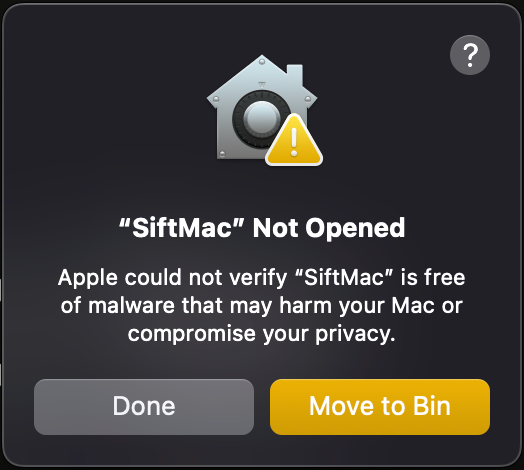
Click Done, on the left. The other button throws SiftMac away. -
Click this button, then Open Anyway.
Open Privacy & Security
Your browser asks whether it may open System Settings: say yes. Then scroll down to Security and click Open Anyway, confirm with Touch ID or your password, and click Open Anyway once more.
SecurityAllow applications fromApp Store & Known Developers“SiftMac” was blocked to protect your Mac.
That’s it. SiftMac opens, and from now on it opens like any other app.
Rather skip the warning? Install from Terminal instead. Open Terminal (Applications › Utilities), paste this line and press Return. SiftMac downloads, goes into Applications and opens, and macOS doesn’t stop it.
curl -fsSL https://siftmac.com/install.sh | shRead the script before you run it, if you like.
If it doesn’t go to plan.
There’s no Open Anyway button
It appears only after macOS has stopped SiftMac (step 2), and stays for about an hour. Open SiftMac again, click Done, then click Open Privacy & Security again. If the button didn’t open Settings, open System Settings yourself and click Privacy & Security in the sidebar.
I clicked Move to Trash
No harm done. Drag SiftMac from the Trash back to Applications, or download it again, and start from step 1.
I’m on macOS 14 Sonoma
There’s a shorter way: in your Applications folder, Control-click SiftMac, choose Open, then click Open. The steps above work too.
I’m comfortable with Terminal
Use the one-line install above: it downloads SiftMac with curl, which doesn’t mark it as downloaded, so macOS doesn’t ask. Already have SiftMac in Applications? xattr -dr com.apple.quarantine /Applications/SiftMac.app removes the mark from your copy, and it opens without asking.
Why does macOS ask at all?
Apple “notarizes” apps for developers in its $99-a-year programme. I’m one developer and SiftMac is new, so it isn’t notarized yet; it will be. Until then macOS asks you to confirm once. SiftMac never sends your files anywhere, and nothing is removed until you press Clean up. Questions? Write to support@siftmac.com. — Mohit